If Google’s home page looked unfamiliar this week, you were not imagining it. The blue “Google Search” button that has sat under the search box for two decades has quietly disappeared for some people, replaced by three shortcuts into Google’s AI tools.
What actually changed
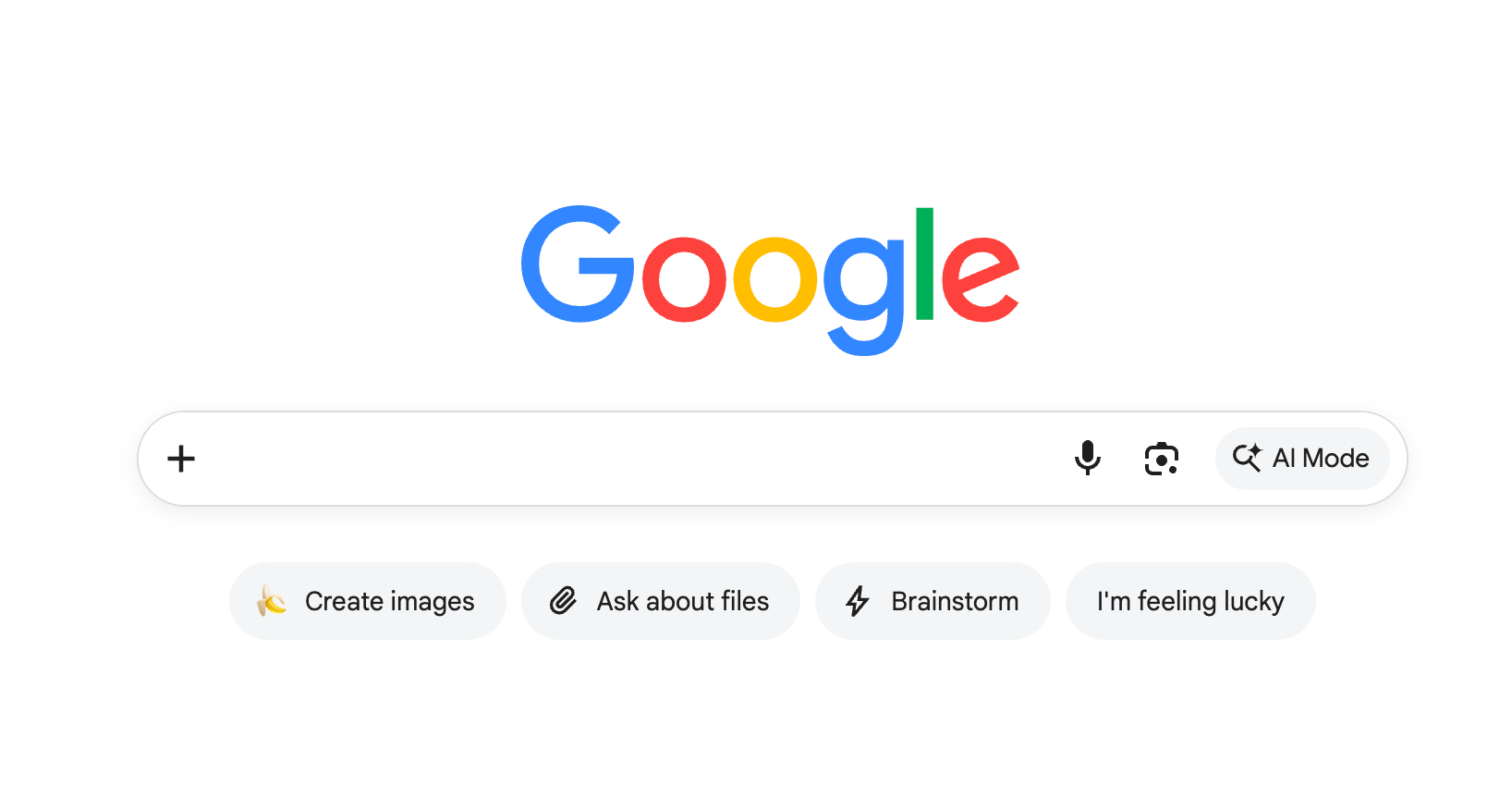
Three new buttons now sit under the search box: Create images, Ask about files, and Brainstorm. “I’m Feeling Lucky” survived the cut. The box itself picked up a plus sign on the left for uploading images and files, alongside the microphone, Google Lens, and an AI Mode button.
Barry Schwartz spotted the change on August 10. Google confirmed it a day later. Robby Stein, Google’s VP of Product for Search, wrote on X: “This is a small test on desktop to help people find new things they can do with Search. No impact to how the core search box works, just add your question and hit enter as usual (which is how most people search anyways!)”
The test is small: desktop only, a limited number of users, and mostly people who are not signed into a Google account.
What the three buttons do
Create images opens AI Mode with prompts for generating pictures, powered by Google’s Nano Banana image model. You will need to be signed in for this one.
Ask about files lets you upload a document, PDF or spreadsheet and ask questions about it in plain language. Think of it as handing Google your insurance policy and asking what your deductible is, instead of reading forty pages yourself.
Brainstorm drops you into a back-and-forth conversation on any topic, closer to talking with a chatbot than running a search.
All three lead into AI Mode, Google’s conversational search experience.
Your normal search is untouched
This is the part worth repeating: type a question, press Enter, and you get the same results page you have always got. The buttons are optional signposts, not a new front door. Nothing about how you search has to change.
Why Google is doing this
Reach is not Google’s problem. At I/O in May, Sundar Pichai said AI Mode had passed 1 billion monthly active users within a year of launch, with AI Overviews above 2.5 billion. Discovery is the problem. Most people still open Google, type, and hit Enter, exactly as Stein described. Very few know they can upload a tax form and ask questions about it. Buttons on the home page are the bluntest available fix, and they may not work: Schwartz’s own reaction was that after twenty years of ignoring “I’m Feeling Lucky”, he expects to ignore these too.
What this means for you
Try Ask about files on something genuinely tedious: a lease, a medical bill, a warranty, a bank statement. This is where AI search earns its keep, and it is the feature most people do not know exists.
Use Brainstorm when you do not have a specific question yet, like planning a trip or narrowing down a big purchase.
Keep pressing Enter for facts: prices, opening hours, and anything where you want to see the source. AI answers still get things wrong, and a results page shows you who is telling you what.
Do not panic about the missing button. It is a test, and Google runs hundreds of these every year. Plenty never ship.
The bigger picture
Google spent 25 years training the world to type and press Enter. It is now spending real estate on its most valuable page to teach people something new. Whether these buttons survive matters less than the direction they point in: Google wants search to be a conversation, and it is willing to redesign its own front door to get you there.